source: https://medium.com/interpreted/local-pypi-cache-server-4a5c2d5ea0bf
I am in a state that I need to actively create and delete a virtual environment. While in default pip look for the local cache of Python in your computer. I don’t think that solution is viable for me. For example, installing PyTorch will require me to download a single 2050 MB WHL file. What if I need to install PyTorch again in different computer in my home?

Of course, I canceled the operation. In many cases, you will need to use --no-cache argument to reinstall a problematic package or when you need to test your newly uploaded python package at PyPI. Or maybe, you are in a small, fluid python developer team, and your colleague, always complaining about how poor performance of PyPI. You are not alone and there are solutions to address this problem by creating a local PyPI server:
- scrapinghub/docker-devpi: pypi caching service using devpi and docker (github.com)
- pypiserver/pypiserver: Minimal PyPI server for uploading & downloading packages with pip/easy_install (github.com)
- EpicWink/proxpi: PyPI caching mirror (github.com)
Choose any, but for me, I tried the last-mentioned package above because I found it first! (You may want the second package above because it seems more ‘fancy’)
I use docker, but it is possible to run it locally. I use this docker-compose file below:
version: '3.3'
services:
    proxpi:
        container_name: proxpi
        restart: always
        image: 'epicwink/proxpi:latest'
        ports:
          - '9191:5000'
I expose port 5000 to 9191 because I think it is easier to remember because I think 9191 == Pypi. 😅 If it up, you can check at <ip address>:9191 in your browser.

Don’t worry if it says “Not Found” because proxpidoesn’t have a web user interface. Now you can try to install any Python package available at PyPI.
pip install — index-url http://192.168.1.3:9191/index/ simplejson
But you may face this problem now:

It is because your new cache server is not trusted according to pip. To fix this, you will have to edit pip.cfg (Linux, OSX) or pip.ini (Windows). Replace my IP address with yours.
[global]
index-url=http://192.168.1.3:9191/index/
extra-index-url=http://pypi.python.org/pypi
[install]
trusted-host=192.168.1.3
             pypi.python.org
Also, refer this simple documentation furthermore. Since I use a virtual environment named rl, then I need to place pip.ini inside my virtual environment folder:
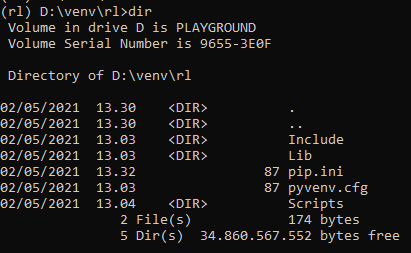
Let’s try again to install a python package, now without specifying the server address. I use — no-cache to force pip to redownload the package, you usually don’t need it.
pip install simplejson — no-cache
Now, you can set the same pip.ini or pip.cfg file to other computers in your workplace. Unfortunately, since proxpi doesn’t come with a web user interface, please refer to proxpidocumentation on how to invalidate the cache and how to set up an advanced setting.
I hope this quick write-up on Sunday will help you and your team. Have a good day.
Leave a Reply